Updated November 26, 2025
Google recently rolled out a new feature in Local Services Ads (LSAs) called “Get Competitive Quotes” that fundamentally changes how potential customers contact tree service companies. Instead of reaching out to one business at a time, homeowners can now send their project details to multiple tree care providers simultaneously with a single click. This shift has significant implications for your lead costs, conversion rates, and overall LSA strategy.
If you’re running Local Services Ads for your tree care business, you need to understand how this feature works, what it means for your advertising budget, and how to track its impact on your bottom line. This guide breaks down everything you need to know.
Key Takeaways
- The “Get Competitive Quotes” feature allows customers to contact up to four tree service businesses simultaneously through a single request, increasing price competition among providers.
- Each business that receives a multi-recipient quote request is charged for that lead, potentially inflating your lead costs without proportional increases in conversions.
- You can identify competitive quote leads in your LSA dashboard by the note “This consumer has contacted multiple businesses” that Google adds to these message threads.
- Turning off message leads in your LSA profile is currently the only way to avoid receiving competitive quote requests, but this also eliminates all message-based leads from your pipeline.
- Tracking competitive quote leads separately from standard LSA leads is essential for understanding your true cost per acquisition and ROI for this new lead type.
Don’t have time to read the whole article? Download the Quick Reference Guide!
What Is the “Get Competitive Quotes” Feature in LSAs?
The “Get Competitive Quotes” feature in Google Local Services Ads allows customers to request price estimates from up to four tree service businesses simultaneously through a single message request. All selected businesses receive the same lead at the same time and are each charged for that lead.
This feature represents a significant shift from traditional Local Services Ads, where customers contacted one business at a time. Now, homeowners can compare multiple tree care providers with minimal effort, streamlining their decision-making process while intensifying price competition among service providers.
Google began testing similar features last year with “message multiple businesses” in May 2025 and “get multiple quotes” sometime around October 2024. But we’ve only seen the “Get Competitive Quotes” feature rolling out more broadly across tree care companies in the USA since September 2025. It doesn’t yet appear to be enabled in all geographic areas, but that’s probably just a matter of time.

To see the 4 top-rated tree service providers near you that Google has selected for you, click on the button that says “See selected businesses”. All companies will get the person’s message and email address (and phone, if it’s included).
How the LSA Competitive Quotes Process Works
The competitive quotes process follows these steps:
- A homeowner searching for tree services sees the “Get Competitive Quotes” message in LSA results.
- They select multiple tree care companies (up to four businesses) from the options Google presents.
- The customer enters their project details, contact information (only email is required), and any special requests.
- Google simultaneously sends this information as a message lead to all selected businesses.
- Each company receives the request in its LSA dashboard and can respond with its quote.
According to Google’s official announcement in November 2025, the company refers to this internally as “Message Fanout”.
Which Tree Services Companies Are Shown in the Competitive Quotes Options?
Google selects businesses for competitive quotes based on proximity, reviews, response speed, profile completeness, and messaging settings. Only businesses with messaging enabled can participate.
Five ranking factors determine which tree service companies Google shows in competitive quotes:
- Proximity to customer: Businesses closer to the searcher’s physical location get priority placement.
- Review quality & recency: High ratings, recent reviews (and a consistent flow of them!), and substantial positive review counts improve visibility.
- Response speed: Historical responsiveness to LSA leads affects ranking; the more quickly you respond to message leads, the more likely you are to be recommended in the “Get Competitive Quotes” section.
- Profile completeness: Fully optimized profiles with the Google Verified (formerly Google Guaranteed) badge rank higher.
-
Messaging enabled: Only businesses that accept message leads can be shown in the “Get Competitive Quotes” section.
Learn more about how reviews impact your LSA costs and visibility.
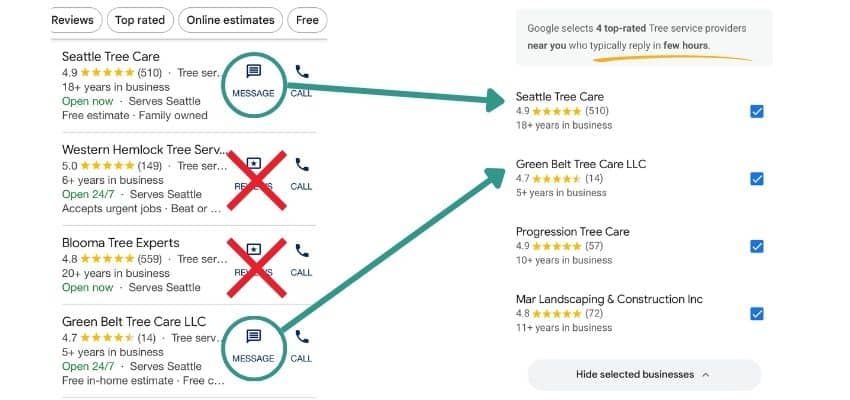
The screenshot on the left shows the top 4 companies in the local search results for “tree service Seattle”. Only two of them have messaging enabled. On the right are the top 4 companies recommended by Google after clicking on “Get Competitive Quotes”. Notice that the companies without messaging turned on do not appear in the list of companies eligible for multi-recipient leads in LSAs.
Pros and Cons of “Get Competitive Quotes” for Tree Service Companies
The competitive quotes feature increases lead volume and maintains top search visibility, but intensifies price competition and may inflate lead costs without corresponding increases in bookings. Success depends on your ability to respond quickly and differentiate on value rather than price alone.
Understanding both the advantages and challenges of “Get Competitive Quotes” helps you make informed decisions about your LSA strategy.
| Advantages | Disadvantages |
|---|---|
| Increased lead volume: More customers request quotes because the process is easier, expanding your pipeline. | Intensified price competition: Customers see multiple quotes simultaneously, pressuring you to compete primarily on price even when your service quality justifies premium rates. |
| Top search visibility: Your business stays above traditional Google Ads and organic results. | More price shoppers: Some leads may be gathering broad price ranges with no immediate intent to hire, potentially lowering your average close rates. |
| Pay-per-lead model: You still pay per lead rather than per click, so spending is tied directly to actual customer contacts. | Estimating challenges: If you require on-site assessments for accurate quotes (as most tree services do), your preliminary estimates may look less attractive than competitors offering flat-rate pricing. |
| Trust factor: The Google Verified badge adds credibility, especially when customers can directly compare multiple providers. | Inflated lead costs: Each business that receives a multi-recipient quote request is charged for that lead, which means your lead budget may be used up more quickly without a proportional increase in bookings. |
| Performance insights: Direct comparison shows how your pricing, review quality, and response speed stack up against competitors. | Higher workload: The need for faster follow-up, more customized quoting, and clearer communication increases your sales administrative workload. |
According to Search Engine Land’s October 2024 analysis, the lack of transparency around how multi-recipient charges are applied makes it harder for advertisers to calculate true ROI.
“The competitive quotes feature changes the game for LSA lead quality. We’re seeing these leads behave more like cold inquiries than the warm leads traditional LSAs generate. The key is treating them differently in your sales process and tracking them separately in your metrics. If you’re not segmenting competitive quote leads from standard LSA leads, you can’t accurately calculate your true cost per acquisition.”
Panajota Gushkova, Paid Search Lead
How to Handle Tree Service Quotes for “Get Competitive Quotes” Leads
Tree service companies are not required to provide binding quotes through the competitive quotes feature. Google’s LSA policies explicitly state that businesses decide how to respond to referrals, allowing you to offer preliminary estimates that require on-site confirmation for final pricing.
Tree service pricing depends on variables like tree size, location, access challenges, proximity to structures, and specific hazards that often make remote quoting impossible. According to Google’s official LSA policies, “Google won’t recommend prices or fees for services and won’t negotiate prices with your customers. You are solely responsible for deciding which referrals to pursue and how you respond.”
Best Practices for Communicating Preliminary Estimates
Follow these four guidelines when responding to competitive quote requests:
- Be transparent about your process: In your quote response through the LSA system, clearly state you’re providing a preliminary estimate or range, and that final pricing requires an on-site assessment.
- Use specific language: Include phrasing like “This is a preliminary estimate based on the information provided. Final pricing will be confirmed after a complimentary site visit to assess tree size, condition, and site-specific factors.”
- Provide helpful price ranges: Offer typical price ranges for common jobs (tree removal, pruning, stump grinding) to give prospects a realistic sense of costs while managing expectations.
- Pivot to scheduling: Many successful tree companies use this as an opportunity to immediately offer a free estimate appointment, converting the quote request into a site visit booking.
Sample Response Template for LSA Multi-Recipient Message Leads
Use this template when responding to competitive quote requests:
“Thanks for your interest in [Company Name]’s tree services. Every property is unique, so providing an accurate quote requires an on-site evaluation. The range for similar projects in your area is typically $[X,XXX – X,XXX], but we can give you a firm price after a free, no-obligation site visit. When would be a good time for us to stop by and assess your needs? We’re available [specific days/times]. We can also provide a more refined estimate before our visit if you’re able to text us a few photos of the tree(s) and your property.”
Managing Your LSA Messaging Settings to Control Competitive Quotes
Summary: Messaging settings in Local Services Ads control whether customers can contact you through Google’s messaging system or only by phone. Turning off message leads is currently the only way to avoid competitive quote requests, but this also eliminates all message-based leads from your pipeline.
What “Messages Turned On” Means for Your LSA Profile
When you enable message leads in your LSA profile, you allow potential customers to contact your business through Google’s messaging system, not just by phone.
How Do You Turn On/Off LSA Messages?
According to Google’s support documentation updated in 2025, you manage this setting by going to your LSA lead inbox on desktop, navigating to Profile & Budget, and toggling the “message leads” option.
What Are the Benefits of Enabling Messages in LSAs?
Turning on messages provides these benefits and features:
- Customers can send messages, including requests for a quote, through an anonymized Google messaging interface
- You receive leads via messages in addition to phone calls
- Message leads typically cost less than phone leads (pricing varies by market and lead quality but has historically been about half the cost of phone leads)
- Google measures your messaging response speed, which affects your ad ranking
- You become eligible for the competitive quotes feature (only message-enabled businesses can participate)
What Happens When You Disable LSA Messaging?
Turning off message leads in your LSA profile creates these four specific changes:
- You avoid competitive quotes: Only businesses with messaging enabled can participate in the “Get Competitive Quotes” feature, so disabling messages effectively opts you out.
- You still receive phone leads: Customers can still call you directly through your LSA listing. Phone functionality remains fully operational regardless of your messaging settings.
- Your total lead volume decreases: You’ll miss out on all message-based leads, not just competitive quotes. Some customers prefer messaging over calling, so your overall lead count will decrease.
- Email notifications continue: Even with messaging disabled, you still get email notifications for phone leads and can manage them through your LSA dashboard.
Should You Enable or Disable LSA Messaging?
Keep messaging ON if you:
- Can consistently respond to messages within 5-15 minutes during business hours
- Have systems to handle an increased volume of price-shopping leads who may never convert into customers
- Successfully compete on a strong value proposition beyond just price and can quickly convey that to prospects
- Can afford to test competitive quote lead performance for 30-60 days
- Want to maximize total lead volume
Turn messaging OFF if you:
- Cannot respond quickly to messages during business hours
- Lack the administrative bandwidth to handle competitive quotes
- Face intense price competition in your market
- Prefer the higher-intent nature of phone-only leads
- Have a limited LSA budget and need maximum ROI per lead
Important: You can test both approaches. Try messaging ON for 30-60 days while tracking competitive quote lead performance, then make a data-driven decision about whether to keep it enabled.
How Can You Tell if Competitive Quotes in LSAs Are Worthwhile For You?
The single most important step you can take to know if these multi-recipient leads are generating a return for your business is to track competitive quote leads separately from your standard LSA leads. This allows you to segment them for performance analysis. Without this segmentation, you can’t accurately assess the true ROI of your LSA spending or make informed decisions about your messaging settings.
How to Identify Competitive Quote Leads in Your LSA Dashboard
Google Local Services Ads identifies competitive quote leads through a specific notation in message threads. Currently, this notation in the message thread is the primary way to distinguish these leads from standard message leads. Google’s official billing dashboard shows your total “Number of Charged Leads” but does not separate competitive quote leads into a distinct category.
When you open a message lead in your LSA dashboard, you’ll see a note stating “This consumer has contacted multiple businesses” if the lead came through the competitive quotes feature. This notation appears in the message conversation and is currently the primary method to distinguish competitive quote leads from standard message leads.
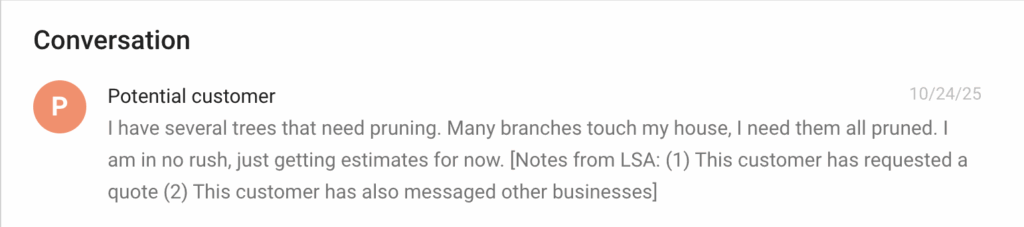
Google doesn’t make it easy to find which leads have requested multiple quotes! But if you look at the end of the message from a lead, you may see a notation saying “Notes from LSA” and indicating that the customer has requested multiple quotes.
Essential Data Points to Track for Each LSA Lead
Create a simple spreadsheet or add fields to your CRM that capture:
- Lead source: Categorize as “LSA – Standard Phone,” “LSA – Standard Message,” or “LSA – Competitive Quote.”
- Lead date and cost: Record when the lead came in and what you were charged.
- Response time: Track how quickly you responded to competitive quote requests (aim for under 15 minutes).
- Conversion outcome: Did you book a site visit? Did you close the job?
- Job value: If you won the job, what was the final contract amount?
- Conversion timeline: How long from initial contact to booking?
Key LSA Performance Metrics to Monitor
Calculate these metrics separately for competitive quote leads versus standard LSA leads:
| Metric | How to Calculate | What to Expect |
|---|---|---|
| Conversion Rate: What percentage of competitive quote leads turn into booked jobs? | (Booked jobs ÷ Total leads) × 100 | Competitive quote leads may convert 15-25% lower than standard LSA leads |
| Cost Per Acquisition: What’s your actual cost per closed job when you factor in the competitive quote lead price? | Total lead costs ÷ Number of closed jobs | This is your critical ROI metric; compare it against your standard LSA cost per acquisition |
| Average Job Value: Are competitive quote leads resulting in smaller or larger jobs than your standard LSA leads? | Total revenue ÷ Number of jobs | Determines if competitive quote leads result in smaller or larger contracts |
| Response-to-Close Time: How much longer does it take to close competitive quote leads compared to standard leads? | Days from first contact to signed contract | Tracks whether competitive quote leads take longer to close |
Your Monthly LSA Performance Review Process
Set a recurring monthly review to analyze your competitive quote lead performance. Look for trends in:
- Total lead volume changes: Compare current month to pre-competitive-quotes baseline
- Overall LSA cost per lead: Identify whether your average lead cost is increasing, staying stable, or decreasing
- Changes in your close rate: Monitor whether your overall conversion percentage is declining and how it’s changing for multi-recipient leads specifically
- ROI comparison: Calculate whether competitive quote leads are more or less profitable compared to standard leads
This data will inform whether you should keep messaging enabled, adjust your response strategies, or optimize your LSA profile to compete more effectively.
Use our free LSA Budget Calculator to project your monthly costs based on lead volume.
5 Best Practices for Winning LSA’s “Get Competitive Quote” Leads
Winning competitive quote leads from Local Services Ads requires profile optimization, rapid response (5-15 minutes), value differentiation, easy scheduling, and automated acknowledgments. Speed and value communication matter more than having the lowest price.
1. Optimize Your LSA Profile for Competitive Quotes
Your profile is your first impression. A complete, professional profile builds trust and encourages more quote requests. Accumulate and prominently display positive reviews.
Your profile creates the first impression that influences whether customers select you for quotes. Focus on these three elements:
- Complete all fields: Ensure business details, service descriptions, service areas, and photos are current and compelling
- Build your reviews: Accumulate and prominently display positive reviews; your review count, the recency of reviews, and average rating significantly influence who customers choose to contact
- Keep your profile up-to-date: Keep hours, service areas, and pricing information up-to-date to avoid mismatched expectations
2. Respond Within 5-15 Minutes
Response speed determines win rates more than any other factor when it comes to competitive quotes. The fastest responder often wins the job, even if they’re not the cheapest.
Here’s how to set yourself up for the fastest responses:
- Enable LSA notifications to your mobile phone
- Designate someone responsible for quick follow-ups during business hours
- Aim to respond within 5-15 minutes of receiving a competitive quote request
- Understand that delays beyond 15 minutes significantly reduce conversion probability
3. Differentiate on Value, Not Just Price
When responding to competitive quotes, clearly communicate what makes your tree service different:
- Highlight your qualifications: Mention ISA Certified Arborists on staff, safety protocols, insurance coverage, and years of experience
- Explain what’s included: Provide transparent, detailed pricing information that explains what’s included
- Justify premium pricing: If you’re more expensive than competitors, clearly explain why; break down your estimate to show the additional value you’re providing
- Use social proof: Reference your review rating, years in business, or number of satisfied customers
4. Make Scheduling Easy and Specific
Don’t just send an estimated price range and wait for the customer to respond. Take control of the next step –
- In your initial response, actively offer to schedule a free site visit and give specific time options
- Provide clear choices: “I can visit Tuesday at 10am or Wednesday at 2pm for a free assessment”
- Avoid vague language like “contact us to schedule”
- Include your phone number for immediate scheduling
The easier you make it for customers to take the next step, the more likely they are to choose you.
5. Set Up Automated First Responses
If you can’t respond personally within minutes, set up an automated response that acknowledges receipt of the prospect’s message and sets expectations. Google allows you to enable auto-reply for LSA message leads.
Your automated message should include:
- Immediate acknowledgment that you received their request
- Estimated time for a personal response (be realistic)
- An alternative contact method for urgent needs (such as your phone number)
- Reassurance that you’re reviewing their specific project
Example auto-response: “Thanks for your request. We’ll review your project details and respond with a detailed estimate within one hour. For urgent needs, please call us at xxx-xxx-xxxx.”
What to Do If You Can’t Respond Quickly to LSA Messages
Tree service businesses that can’t respond to LSA messages within 15 minutes have five options: set realistic business hours, pause messaging temporarily, use auto-responses, prioritize fast callbacks, or invest in lead management tools.
Not every tree service business has the staff or systems to respond to LSA messages within 15 minutes. If fast response times aren’t realistic for your operation, you have several options.
Set Realistic Business Hours
Configure your LSA profile hours to accurately reflect when you can actually respond to inquiries. This prevents receiving message leads during times when you can’t answer quickly, reducing frustration for both you and potential customers.
Consider Temporarily Pausing Messaging
If you repeatedly fail to meet prompt response times, temporarily disabling messaging reduces the risk of negative signals affecting your LSA ranking (although it also eliminates competitive quote leads entirely). Focus on responding quickly to phone calls, which you may handle better. LSA messages can be re-enabled once you have systems in place for faster response.
Use Auto-Responses to Acknowledge Messages Immediately
Enable a 60-second auto-reply in your LSA message settings and make sure email and SMS alerts are turned on so a team member can follow up quickly, even if they’re not at a desk.
Prioritize Fast Callbacks Over Message Replies
If you can’t reply to messages immediately, call the customer as soon as possible. A prompt phone call can be more effective than a delayed message response because:
- Phone conversations build rapport faster than text
- You can qualify the lead and answer questions in real-time
- Customers appreciate the personal touch
- You can schedule site visits on the spot
Invest in Lead Management Tools
Consider CRM or messaging platforms that integrate with LSA to help:
- Track and prioritize incoming leads
- Automate initial acknowledgment messages
- Route leads to available team members
- Set reminders for follow-up
- Monitor response times and conversion rates
Frequently Asked Questions About Google’s “Get Competitive Quotes” Feature
Q. Can I opt out of the “Get Competitive Quotes” feature while keeping my LSA ads running?
A. No, there is no direct way to opt out of competitive quotes while maintaining LSA ads. The only method to avoid receiving competitive quote requests is to turn off message leads entirely in your profile settings, which eliminates all message-based inquiries and limits you to phone call leads only. There is currently no toggle in the LSA dashboard to disable just the competitive quotes feature while keeping other messaging capabilities.
Q. Does Google charge me even if three other tree companies also received the same quote request?
A. Yes, each business that receives a multi-recipient quote request is charged for that lead. If a customer selects four tree service companies to contact, all four businesses pay for that lead independently. This is consistent with LSA’s pay-per-lead model but can increase your total lead costs when many customers use the competitive quotes feature.
Q. How do I know which leads in my dashboard came through competitive quotes?
A. Google identifies competitive quote leads by adding a note that says “This consumer has contacted multiple businesses” when you open a message lead in your LSA dashboard. This notation appears in the message conversation thread and helps you identify which leads came through the feature for tracking purposes. You can use this information to segment these leads in your own CRM or spreadsheet for separate ROI analysis.
Q. Are competitive quote leads lower quality than standard LSA leads?
A. Competitive quote leads behave differently from standard LSA leads, rather than being inherently lower quality. These leads tend to have a higher proportion of price shoppers actively comparing multiple providers, which often results in conversion rates 15-25% lower than those of standard LSA leads. However, they’re not necessarily “low quality” because many of these customers do eventually hire someone.
The key difference is that these customers are further up the decision funnel and actively comparing options, whereas standard LSA leads may have already decided you’re their top choice before contacting you.
Q. Will my LSA ranking suffer if I turn off messaging to avoid competitive quotes?
A. Disabling messaging may affect your LSA ranking and visibility in local searches. Google’s official documentation states that enabling message leads in Local Services Ads can help increase the likelihood of receiving leads, especially outside normal phone answering hours, because it provides more ways for customers to reach your business. Tree care businesses offering message leads are more likely to be shown and contacted, which can have a positive impact on performance and exposure.
Response speed to messages also serves as a ranking signal, so removing messaging eliminates that signal from your profile evaluation. However, you can still rank well with messaging disabled if you maintain strong reviews, are located close to the majority of your customers, and have excellent phone responsiveness.
Only you can decide if avoiding competitive quote leads is worth the potential cost in terms of your company’s LSA ranking.
Q. Should I provide pricing in my competitive quote responses, or just ask to schedule a site visit?
A. If you can, provide a preliminary price range or estimate along with a clear explanation that final pricing requires a site visit. Customers using competitive quotes specifically request pricing information, so avoiding the question entirely may cause them to skip your response. Offer a helpful range based on typical jobs, explain which factors might adjust the final price, and then pivot to scheduling the site visit where you can provide an accurate quote. This approach balances customer expectations with the reality of site-dependent tree service pricing.
SHARE AN ONLINE PRICING ESTIMATOR – One way to head off pricing concerns and set yourself apart from competitors is to place an educational and helpful Pricing Estimator tool on your website. Learn more about our Tree Service Pricing Estimator >
Should You Use LSA’s “Get Competitive Quotes” for Your Tree Care Business?
The “Get Competitive Quotes” feature represents a significant shift in how Local Services Ads work for tree care companies. While it may increase your lead volume, it will probably also intensify price competition and potentially raise lead costs.
Your success with this feature depends entirely on your ability to respond quickly, differentiate your value proposition, and track your results accurately. If your operation can handle rapid response times and you have strong systems for converting price-shopping leads, the increased volume may benefit you. If you’re stretched thin administratively or compete primarily on service quality rather than price, the feature may erode your ROI.
The most important action you can take right now is to start tracking competitive quote leads separately from your standard LSA leads. Collect at least 30-60 days of LSA data (more, if you get relatively few LSA leads per month) on conversion rates, average job values, and cost per acquisition before making major strategic decisions about your messaging settings or LSA budget.
PRO TIP: This feature is still relatively new, and best practices are still emerging as more tree service companies gain experience with it. Stay flexible, monitor your metrics closely, and be prepared to adjust your approach as you learn what works for your specific market and business model.
Need Help Optimizing Your Tree Service Marketing?
At Tree Care Marketing Solutions, we help tree care companies navigate the constantly changing world of digital advertising, including Local Services Ads strategy and implementation. If you’re struggling to manage your LSA performance or want expert guidance on optimizing your entire digital marketing strategy, we’re here to help.
As licensed arborists who also specialize in marketing psychology, we understand both the tree care industry and how customers make hiring decisions. Contact us at 520-900-1226 or request a consultation to discuss how we can help your tree service business grow profitably.
About the Author