Updated February 10, 2026
These days, inbound spam volume is a cost of doing business on GBP; every tree care company with a listing gets endless robocalls trying to scam them out of information, money, and worse. And then there’s all the time wasted dealing with this crap; answering the phone only to hear a ‘click’ before the caller hangs up, getting an earful in a foreign language, or finding out that “your Google business listing isn’t appearing in searches.”
But in November 2025, we began seeing a massive uptick in spam calls to tree service companies from Google Business Profile (GBP).
As of right now (January 2026), our client lead tracking database shows that, on average, 40% of “leads” from Google Business Profile (GBP) are spam. Plus, about 25% of calls from direct website traffic are classified as spam. And the overall percentage of “leads” that are spam is consistently increasing.
We get a lot of clients asking what’s going on – why are they getting so many spam calls, and how can we make it stop?
Bad news: We can’t stop the spam. But we can stop it from reaching you! Keep reading to see how to filter most of these spam calls before they waste your time.
About Spam Calls from Google Business Profile (and Other Sources)
Q. Where are these spam GBP calls coming from?
These calls are from scam and lead‑generation outfits scraping GBP data and blasting robocalls at those numbers.
Q. How did scammers get my GBP phone number?
Scammers get GBP phone numbers through data scraping and public exposure. Your business phone number on Google Business Profile is publicly accessible and uses a specific, structured format (business category + city + phone number), making it easy for automated harvesting.
Primary Ways Spammers Obtain Your GBP Phone Number
1. Automated GBP Scraping
- Bots crawl Google Maps daily, pulling every tree service, landscaper, and arborist phone number.
- Your GBP number is a “honey pot” because it’s tied to a real, local business (that’s considered a high-value lead).
- Scammers don’t even need to hack anything – everything they need is right there in Google’s structured data.
2. Lead Generation Lists
- Your number is included in “US tree service owners” lists, sold for $0.02–$0.10 per contact. These lists are then resold repeatedly through dark web markets and legitimate-looking lead brokers.
3. Previous Business Use
- If you inherited the number from another business, it may already be on spam lists.
- Numbers used by telemarketers and high-volume callers nearly always carry baggage.
4. GBP Phone Number Hijacking (this is less common but happens occasionally)
- Scammers sometimes edit GBP listings to swap legitimate numbers for their own. Google usually catches this, but it does happen, so keep an eye on any changes to your profile.
 Q. Why are spam callers targeting GBP phone numbers?
 Q. Why are spam callers targeting GBP phone numbers?
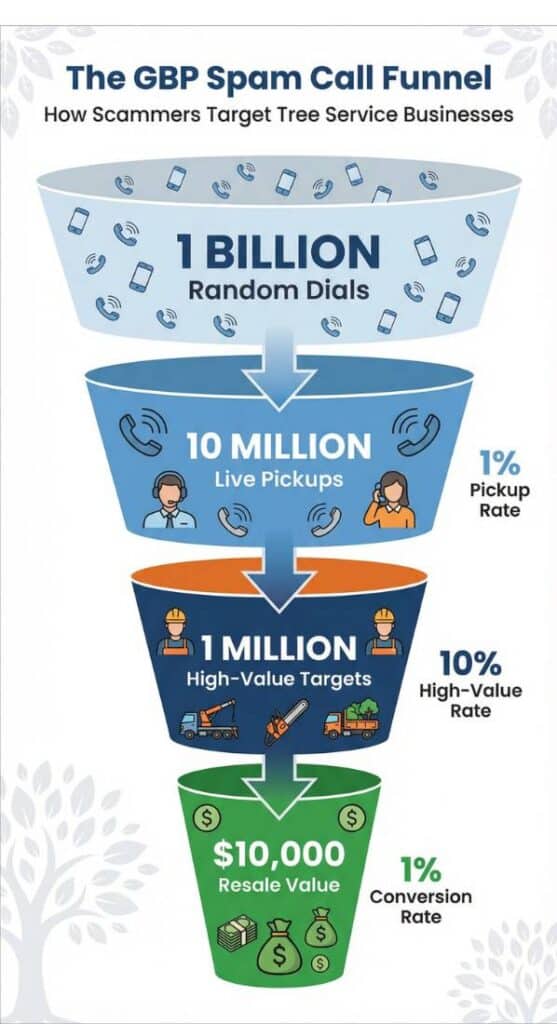
Google Business Profile phone numbers are associated with real local businesses, making them a good “mark” for spammers. As a result, they receive a very high volume of junk robocalls.
Q. Why are tree service companies being targeted by GBP spam calls?
Spammers call the GBP phone numbers of tree care businesses because they’re more likely to answer than many other types of small businesses. That’s especially true for companies that do emergency tree work. This tends to be a high-dollar service that needs a quick response from the business, making it a perfect spam target.
Q. What are these robocallers trying to do?
Robocallers on GBP are trying to get either your money or your personal information. Common scams we frequently see are callers trying to:
- Sell fake or unnecessary “Google listing” or “front page” services, often asking for recurring fees or card details.
- Phish for business owner identity info under the guise of “verification,” which can feed account takeovers or other fraud.
Q. What are some examples of spam calls?
A quick search through our lead tracking system turned up 1,129 spam calls so far this month, with 82% of those coming from GBP. The list below shows some common scams coming through GBP listings:
- “Your Google listing has been flagged in our system for issues with verification. Please press 2 immediately to speak with an authorized representative from my Pro Directory to take care of this. Your listing may be suspended or not appear in searches if we do not take care of this. Please press 2 now.”
- “We’re having an issue with your Google business listing. Please press zero immediately so a strategic specialist can help sort this out. We’d like to get this fixed by the end of the day so your listing doesn’t stop showing up on Google searches. Again, please press zero to get this handled.”
- “It seems there is an issue with the keywords attached to your Google Business Listing. Your Google Business Listing has been flagged for review by the Business Listing Specialists.”
- “Have you considered selling your business? This is Jennifer with one of the leading business brokerage teams in your area. We currently have over 6,000 qualified buyers actively looking for businesses just like yours. We can provide a free, no-obligation…”
- “Hello, this is Business Listing Verification with an urgent message. We are calling you because your business is not verified on Google Voice Search. Customers cannot find your business. Press 0 to verify your business. Press 9 if you wish to have your business not display on Google Voice Searches.”
- “This is an important message regarding your Google Business account. Our system shows a new search for your business via Google and Google Voice clients are currently having trouble finding you. Press 0 to speak with an agent immediately and verify your Google listings. Again, your business is not showing correctly on Google and Google Voice search.”
- “Please don’t hang up the phone. This is an important message regarding your Google Business account. Our system shows a new search for your business via Google, and Google Voice clients are currently having trouble finding you. Press 0 to speak with an agent immediately.”
- “Hello. Hello. Hello. Hello. Hello. Hello. Hello. Hello. Hello. Hello. Hello. Hello? Hello. Hello. Hello. Hello.”
PRO TIP: Educate staff that Google does not cold‑call to sell ranking, verification, or one‑time “listing fixes”; any call with urgency, threats, or payment requests should be treated as spam and ended immediately.
Q. Why do spammers call and then hang up?
Spammers use silent “pings” or brief rings to confirm your number is live and active (not disconnected, voicemail-only, or filtered).
They do this for several reasons:
1. Build Valuable Lead Lists
- A “live” number is worth $0.01–$0.10 on the black market to telemarketers, scammers, and lead brokers.
- Dead numbers waste dialer credits; live numbers are sold repeatedly.
- Your number gets added to premium lists, such as “US-based,” “business owners,” and “responds to calls.”
2. Prioritize High-value Targets
- Numbers that are answered quickly indicate the recipient is more likely to engage, increasing the likelihood of scam conversion.
- They rank numbers by “responsiveness” for their live agents to call.
3. Avoid Wasting Live Agents
- Robodialers can place 1,000+ calls/minute; they only connect you to a live agent if you answer the phone.
- Your pickup tells their system: “We have a live one! Route this one to a human and let’s see if we can scam them.”
4. Create Callback Confirmation
- If you call back, they know you’re not only a “real person” but also curious and willing to engage. This makes your number even more valuable.
How to Handle Spam GBP Calls
Q. How can I tell if a call is likely to be from a spammer?
Here are the common signs of a spam caller, both before and after answering the phone.
Inbound Spam Indicators: What to Look for Before Answering
Caller ID/App Warnings
- “Spam Likely,” “Scam Risk,” or “Suspected Spam” labels from your phone carrier or apps (Google Phone, Truecaller, Hiya, etc.).
- Spoofed local area codes (e.g., the call comes from your area code, but it’s not a known client).
- Neighbor spoofing using numbers very similar to yours (like 520‑555‑0123 when yours is 520‑555‑0124).
Typical Spammer Call Patterns
- High volume of calls from the same/similar numbers in a short period.
- Calls that ring briefly and then hang up (these calls are usually robocallers testing whether the line is live).
- Calls outside business hours or during lunch.
Spam “Tells” During the Call (Answer Cautiously!)
Robocall Red Flags
- Pause/click before anyone speaks – this is the system connecting you to a live agent or recording.
- Generic greetings, such as “Hello, this is Rachel from Card Services” or “Your Google listing is about to expire”.
- Urgency or pressure (“Act now or lose your account”).
- Requests for personal info or payment details.
- Poor audio quality or a robotic voice.
Live Scammer Tells
- Caller ID doesn’t match their story – for example, the caller claims to be local but has a heavy accent or a bad connection.
- Won’t give their supervisor’s name or a callback number.
- Pushes for immediate action without verifying any details from you.
Proactive Tools to Automatically Identify Spam Callers
- Spam Challenge: This forces the “caller” to make a DTMF input; bots fail this test. (Dual-Tone Multi-Frequency (DTMF) is the signaling system used in telecommunications to transmit keypad input over voice channels, commonly known as touch-tones.)
- Carrier spam blocking, such as T-Mobile Scam Shield, AT&T ActiveArmor, and Verizon Call Filter.
- Third‑party apps, like Truecaller, RoboKiller, and Hiya, crowdsource spam databases to screen out scam calls.
- The Google Phone app has a built‑in spam detection if you’re on a Pixel/Android.
Golden rule: If unsure, let the call go to voicemail. Real clients leave messages; spammers rarely do. And never call back unknown numbers – that just confirms your line is live and you’ll be added to their dialing list to be sold at a premium.
Q. I thought speed to lead was critical for tree service companies. Shouldn’t I be answering or returning all calls as quickly as I can?
Yes, absolutely answer and return legitimate calls as fast as humanly possible.
Speed-to-lead is make-or-break for tree service companies. Tree care leads are ultra-time-sensitive –
- Homeowners often want service now, especially for situations like a fallen tree or storm damage.
- They call 3 to 5 companies in a row. If one doesn’t answer, they go to the next immediately.
- In most cases, the first company to answer books the job (often the same day).
The key is to answer or return only legitimate calls.
Stopping Spam Calls From Reaching Your Phone
Q. How do I screen out spam calls?
 Q. How do I screen out spam calls?
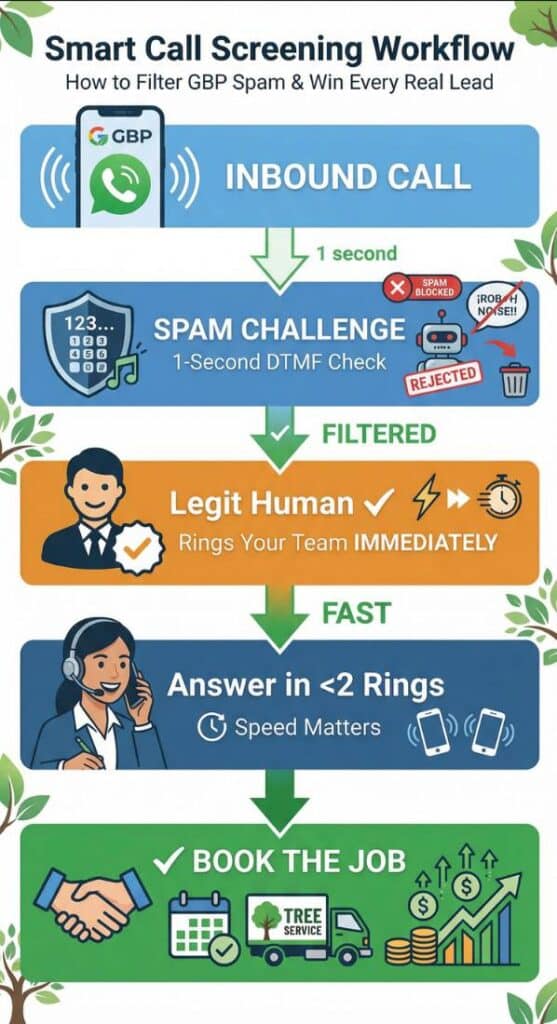
Most phone and call tracking systems have a filtering process or workflow that allows you to automatically block robocalls while instantly passing real humans through. The filter runs before a call is routed. That means your phone will only ring when a legitimate call comes in.
Here’s what the process looks like:
- A call comes in from your GBP number
- The system triggers a spam challenge through IVR (interactive voice response) that asks the caller to “press 1 to be connected.” It takes a human about 1 second to do this, but bots/robodialers cannot pass this DTMF check. You can also use a message like “Thanks for calling Acme Tree Care. Please press 1 to schedule an estimate, press 2 to reach our office.”
- If the caller presses 1, it confirms they’re a legitimate caller
- The phone rings at your end immediately
- Answer in 2 rings or less for the best chance of booking the estimate/job!
Result: You connect with 100% of legitimate calls instantly without you or your team wasting time on GBP spam bots.
Businesses that add this kind of IVR gate typically see spam volume drop sharply with no measurable decrease in real conversations. Legitimate callers are motivated to contact you, and most are accustomed to phone menus.
Q. Won’t I lose potential customers if I put a spam challenge/IVR gate in place?
I’ve spoken with many tree service owners who don’t want to implement this type of call screening. Some worry that it will turn off potential customers, others don’t like the experience themselves and so assume others won’t either, and a few are concerned that they’ll miss legitimate leads. Those may seem like legitimate concerns, but think about it this way –
- The spam challenge is only applied to calls from your GBP listing; all other callers are routed directly to your phone.
- Currently, fewer than 60% of calls from GBP are real humans – the rest are bots.
- So, if you get 100 “leads” from GBP in a month, 60 potential customers will be asked to “press 1”. How many do you think will hang up instead of pressing 1? In my experience, very few legitimate callers will hang up at that point.
You might lose a tiny number of legit callers, but you’ll lose far more money and time by not filtering spam. The trick is to implement the challenge in a way that minimizes friction for real people.
You mainly risk losing someone if:
- The prompt is long, confusing, or sounds sketchy (e.g., robotic, low‑quality audio).
- The caller is in a panic (tree on the roof at 2 am) and hangs up before listening.
- The DTMF detection is flaky and doesn’t register key presses.
Q. How do I minimize potential lead loss from implementing a spam challenge?
There are four easy steps you can take to help prevent real leads from hanging up before they’re connected.
- Keep the message short and natural. “Thanks for calling [Company Name]. Press 1 to connect.”
- Play it immediately (avoid a long intro!) and set a reasonable timeout (e.g., 5–7 seconds).
- Don’t nest multiple menus. Require only one quick keypress, then go straight to a human.
- Monitor closely for the first couple of weeks. Watch missed calls/voicemails and confirm you’re not seeing a drop in qualified calls.
Why You Should NOT Call Back Unknown Numbers That Hang Up Without Leaving a Voicemail
Q. What will happen if I accidentally call a spammer back, thinking they’re a prospect?
Calling back spammers can harm your phone number’s outbound reputation.
Here’s why:
Carrier algorithms track your outbound calling patterns, and calling spammers creates several red flags:
- High short-duration calls: Spammers usually hang up fast (3–10 seconds) after you confirm you’re live. Lots of 3–5 second calls look exactly like robocall confirmation tests.
- High rate of unanswered calls/invalid numbers: Spammers use throwaway VoIP numbers or numbers that don’t pick up, tanking your answer rate metrics.
- Rapid dialing patterns: If you call back multiple spammers within a short window, it looks like you’re testing numbers for live pickups (a classic robocaller tactic).
- Neighboring-number effect: Spammers use phone numbers clustered in blocks with similar numbers. Calling numbers near known spam ranges can pull your reputation down with theirs.
The risk compounds if:
- Multiple team members call back different spammers from the same number (or pool of numbers)
- You accidentally hit a “premium” spam line that racks up charges (this is rare but real)
- The spammer spoofs your confirmed-live number to hit others
FIX: Never call back unknown numbers. Let an IVR spam challenge or your carrier’s spam filter handle them. Your outbound reputation stays clean when you never engage inbound junk.
Q. How do I know if I have a spam callback problem?
This is easy to check by examining your outbound call logs. If you see lots of 3–8 second calls to unknown numbers (especially ones that don’t pick up), you likely have a spam callback problem that could contribute to your number being labeled as “Spam Likely.”
PRO TIP: Yes, customer service is critical, and prospects do expect you to either answer the phone or call them back promptly (speed to lead is everything these days!). But if you receive a call from an unknown number that hangs up quickly without leaving a message, it’s probably safe to assume it’s a scam call.
Q. Why do people tell me their caller ID identifies me as “Spam,” “Spam Likely,” “Potential Spam, ”or “Scam Likely” when I call them?
Carriers and spam‑blocking apps maintain reputations for each phone number; if your number’s reputation looks bad, they prepend labels like “Spam,” “Spam Likely,” or “Scam Likely” to your caller ID. Several things commonly cause that:
- High‑volume or “spammy” call patterns: Lots of short calls, many unanswered calls, rapid redials to the same numbers, or big spikes in outbound volume from a single number all look like robocalling to carrier algorithms.
- People marking your calls as spam: Recipients can tap “Report spam” in their phone or in apps like Truecaller/Hiya. If there are enough complaints, the number gets crowd‑sourced into spam databases that carriers and apps share.
- History on the number: If you inherited a number that used to belong to a spammer, or the number has been spoofed by robocallers, it can carry that “spam” reputation even though you’re legit.
- Caller ID / STIR‑SHAKEN issues: If what the network sees doesn’t match a trusted, properly authenticated caller ID, or if your calls often go straight to voicemail/are ignored, the scoring can drift toward “likely spam.”
How to Remove Your Phone Number from Spammer Lists: A Guide for Tree Service Owners
Q. Does receiving a lot of spam calls (e.g., from GBP) affect my caller ID reputation?
No, receiving spam calls to your GBP business number does not harm your outbound caller ID reputation.
Spam calls directed at your number (inbound) are unrelated to how carriers score your outbound calls from that same number. Carrier reputation algorithms look at your calling behavior (such as outbound patterns, complaints from people you call, answer rates, etc.), not who calls you.
The only indirect risk is if:
- Spam volume is so high that you can’t answer legitimate inbound calls, hurting the customer experience.
- Your team accidentally calls back spammers. This can create weird call patterns that carriers may interpret as spamming, hurting your ability to make outbound calls. Do NOT call back unknown numbers that do not leave a message!
Your number showing as “Spam” when YOU call out is 100% driven by your outbound dialing patterns, not by inbound spam.
Q. Do call tracking systems have anything to do with this problem?
If you’ve heard that using a call tracking system increases spam “leads,” you can stop worrying. Call tracking systems, like the one we use here at Tree Care Marketing Solutions, only receive inbound calls to a tracking number and forward them to your phone. This has no connection to the outbound calls you make and does not affect your caller reputation in any way.
Why GBP is Still Worthwhile for Tree Service Companies – Even With the Spam Leads
Okay, so your GBP phone line is a magnet for Google listing scams and generic spam. But that doesn’t mean it’s not worthwhile! In fact, many of our clients generate ⅓ or more of their legitimate leads – and revenue – from Google Business Profile. The key is to identify which leads are spam and which are legitimate, and to handle only the real calls.
Every spam call that rings through delays your response to real jobs, which is where you lose revenue (slow speed‑to‑lead kills tree work).
A one‑second spam challenge usually results in a net increase in booked work because your team spends more time answering real customers and less time saying “No, we don’t need listing services.”
Filter ruthlessly and answer real leads instantly. That’s your competitive advantage.
About the Author